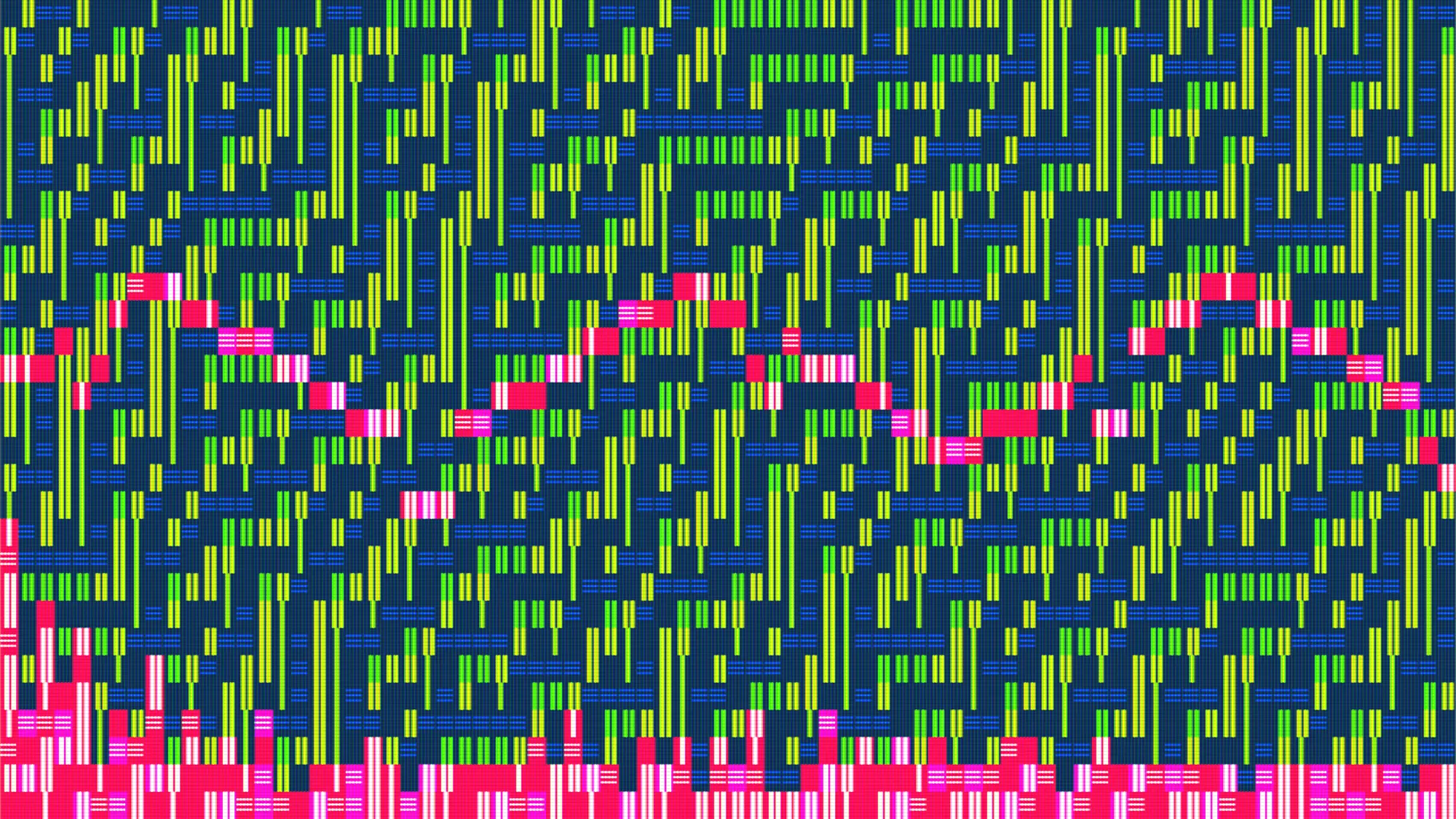
This article dives into the research and thought process behind the development of my fifth long-form generative work, ANSITUNES on fxHash.
My earliest exposure to digital art was viewing ANSI art on bulletin board systems (BBS), a scrolling, text-based experience over a slow dial-up connection. There’s something alluring about the simplicity of a limited color palette rendered with 80 character columns of text. The computers back then were restricted to primitive hardware. Graphics cards could only render 256 colors at a time. Sound cards used on-board oscillators to produce a finite number of sound waves. And yet the creative genius of programmers pushed these limitations to magnificent results.
Whenever I start a new project, it’s usually due to an obsession over some concept. For ANSITUNES, I started going down the rabbit hole of text-based art and early hardware specs. Very quickly that obsession expanded to generative music, chiptunes, and music theory.
ANSI Character Sets
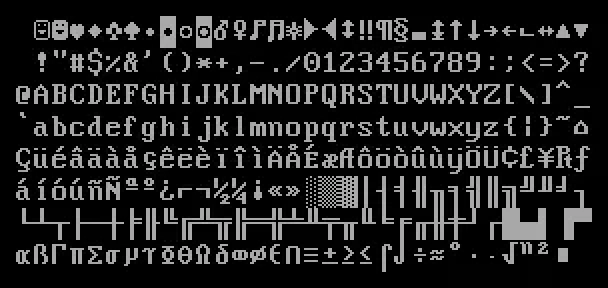
ANSI art exists largely in part to the extended ASCII character set provided by letter sets like code page 437, installed on the original IBM PC and later PC clones. The extended character set went beyond the traditional 128 character limit, and included a wide range of drawing symbols like lines and patterns. With these new glyphs, text could be used more effectively as a drawing tool. Due to the screen resolution limitations of early monitors, ANSI art could only be displayed 80 characters wide, but scrolled indefinitely. I started playing with different code page 437 character sets as a rendering tool to build scrolling artwork in p5.js.
VGA Colors
Introduced soon after the first IBM PC was available were Video Graphics Array (VGA) video display controllers. Virtually every PC used this standard to display video at a ubiquitous 640×480 resolution on cathode-ray tube (CRT) monitors. The available colors ranged from 16 to 256. The default VGA color palette includes the original 16 Color Graphics Adapter (CGA) system colors, 16 gray shades, and 216 colors separated into 24 hues, 3 tints, and 3 shades — with 8 registers left over, assumed to be for user-defined colors.
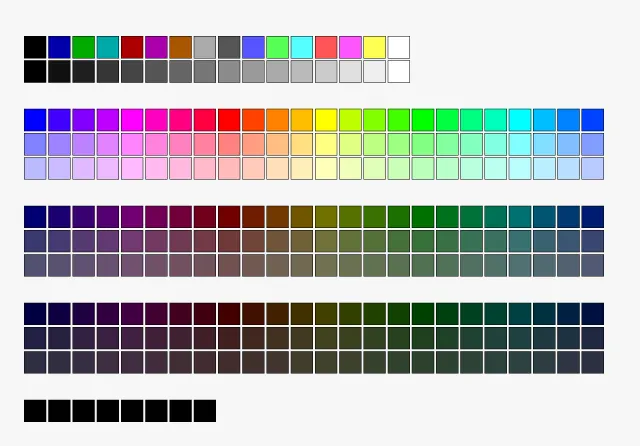
I started playing around with this limited color palette, building it programmatically and then picking color combinations based on traditional color theory. I edited the color palette generation algorithm to try to avoid the darker colors between red and green hues, which looked brown and muddy on the screen, and to lean more towards the fully saturated 24 hue spectrum, with some pastel tints thrown in here and there, and grayscale palettes appearing occasionally.
Below is some pseudocode to generate an accurate VGA color palette, minus the 8 user-defined registers.
// generates an array of colors in RGB format [0-255, 0-255, 0-255]
generateVgaPalette() {
  colors = [];

  // 16 system colors

  reds   = [0, 0, 0, 0, 2, 2, 2, 2, 1, 1, 1, 1, 3, 3, 3, 3];
  greens = [0, 0, 2, 2, 0, 0, 1, 2, 1, 1, 3, 3, 1, 1, 3, 3];
  blues  = [0, 2, 0, 2, 0, 2, 0, 2, 1, 3, 1, 3, 1, 3, 1, 3];
  m = 85;
  for (i = 0; i < 16; i++) {
    colors push [reds[i] * m, greens[i] * m, blues[i] * m];
  }

  // 16 gray colors

  dblinc = [2, 7, 12]; // non-equal increments
  c = 0;
  for (i = 0; i < 16; i++) {
    colors push [c, c, c];
    if (dblinc includes i) {
      c += 21;
    } else {
      c += 16;
    }
  }

  // 214 HSB colors

  // brightness increments
  bi = [1, 0.44, 0.25];

  // saturation increments
  si = [1, 0.5, 0.28];

  // brightness
  for (brightness = 0; brightness < 3; brightness++) {
    v = bi[brightness];

    // saturation
    for (saturation = 0; saturation < 3; saturation++) {
      s = si[saturation];

      // hue
      for (hue = 0; hue < 24; hue++) {
        h = ((hue + 16) % 24) / 24; // 24 hues

        // generate rgb color from hsv
        i = floor h * 6; // split hue into 6 sectors
        f = h * 6 - i;
        p = v * (1 - s);
        q = v * (1 - f * s);
        t = v * (1 - (1 - f) * s);
        c = i % 6;
        if (c is 0) {
          r = v;
          g = t;
          b = p;
        } else if (c is 1) {
          r = q;
          g = v;
          b = p;
        } else if (c is 2) {
          r = p;
          g = v;
          b = t;
        } else if (c is 3) {
          r = p;
          g = q;
          b = v;
        } else if (c is 4) {
          r = t;
          g = p;
          b = v;
        } else if (c is 5) {
          r = v;
          g = p;
          b = q;
        }
        colors push [round r * 255, round g * 255, round b * 255];
      }
    }
  }

  return colors;
}
Chiptunes
Prior to FM Synthesis sound cards becoming standard on early PCs, programmers found a way to produce analog sound waves using electronic impulses directly from the computer chip, hence the term chiptune. This technique was utilized heavily by arcades in the golden age of video games, early popular computer systems like the Commodore 64, and home video game consoles. It’s now a genre of music all its own.
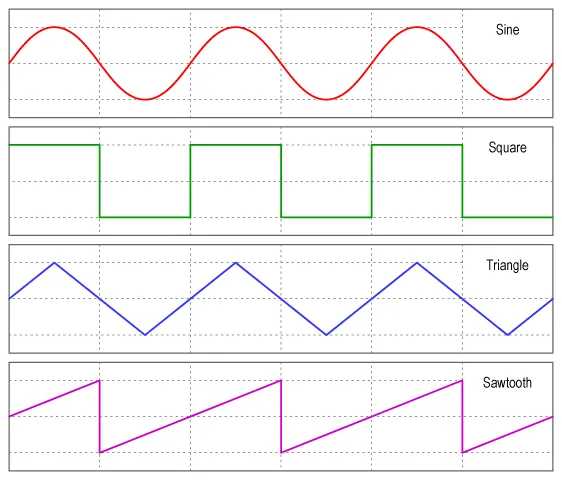
Due to its popularity, the Nintendo Entertainment System (NES) is one of the most notable systems to build upon this sound style. The NES has 5 sound channels: two pulse waves, one triangle wave, a noise channel, and one sound sample channel. Leaving aside samples for now, this leaves 4 channels that equate to a typical 4 person band: noise for drums, triangle for bass, and the pulse channels for lead and rhythm — all of which can be generated purely by code.
I started playing around with different pulse wave widths and other settings in Tone.js, a JavaScript based framework for playing audio in the browser. Changing the widths of the pulse waves results in some variation in the sound tonality of the lead and rhythm parts. By adding portamento, the tracks gain a pitch slide between notes — giving the music a video game phaser-like effect.
But this is generative art. I didn’t want to compose a score — I needed an algorithm to write this music. And while researching different algorithms, I found a way to utilize an elementary cellular automaton (ECA) to build out a music track.
Elementary Cellular Automaton
Using simple rules, ECA can construct a binary sequence along a timeline. If you turn that on its side, you effectively have a piano roll. This concept is heavily explored in WolframTones, where you can see how different ECA rules and music styles can be put together to generate music dynamically.
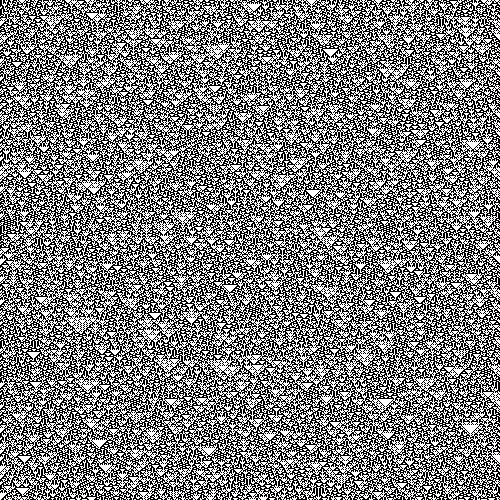
With the ECA rotated on its side as a piano roll, each row can represent the pitch, and each column can represent a part of a measure. To make the music sound like actual music and not noise, I filtered the pitch to different music scales. The algorithm will pick a scale at random, pick a key at random, and assign the appropriate pitch to each row. Then, we select a starting note for the lead, rhythm, and bass parts, and using a random walker algorithm, walk along the piano roll within a pitch range. The random walker tries to stay on a note for as long as possible, and will search for nearby notes to move to as each measure passes. Think of a pianist moving up and down on a music scale, holding notes at different intervals. And all of this is driven by the 1s and 0s of the ECA rule.
Noise For Drums
Now that the lead, rhythm, and bass have instructions to play their parts, I needed to come up with the drum score. The noise generator doesn’t have a pitch, and having the ECA cells drive the drum usually leads to a non-repeating drumbeat — which doesn’t really work for drums. So instead of using the piano roll, I had the ECA rule itself drive the drumbeat. Each ECA rule has 8 unique possible configurations. For example, Rule 30 is derived from 8 bits: 00011110 in binary equals 30. If you spread out the binary sequence over a timed measure, you have a beat hitting on every 1, and resting on 0s. I found my drumbeat.
All four instruments are now playing at a specific tempo. And varying the tempo is easy. I pick a random beats per minute (BPM) number, and throttle the animation based on this beat.
Putting It All Together
Some ECA rules just don’t work with the random walker, or were too boring visually, so I systematically went through each rule and selected the rules that I liked. I also added more variations among the ECA results so that the on and off states each had 8 possible characters and color combinations based on the previous state’s conditions, rather than simply on or off.
Finally, I had a fun, scrolling ANSI experience driving unique music compositions. To accentuate the fact that this is an audio-visual experience, I overlayed sound data using a waveform and a fast Fourier transform (FFT) sequence taken from the master audio.
Bringing It Back Old School
Keeping things ultra-retro, I added some old-school command line features, where you can type commands to display a help screen, control the playback, and export different aspects of the work. I also passed the final visuals through a fragment shader to give everything a classic CRT effect. The results are better than I could have hoped for.
You can play around with ANSITUNES on fxHash before, during, and after its release on August 15, 2024. Be sure to turn your volume up, and enjoy some generative text-based art and chiptune music.
Thanks for reading, and keep making! 🚀